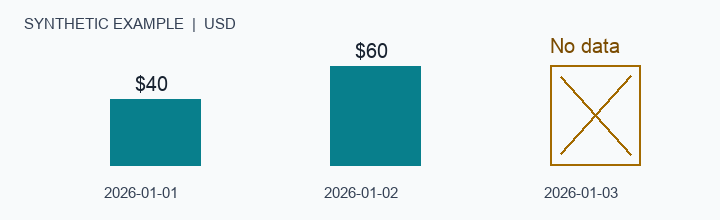
The worked example is synthetic, not a customer case or a claim of improved advertising results.
A report can contain correct numbers and still answer the wrong question. Two days of accurate spend do not make a complete three-day report. An account's local reporting day is not necessarily a UTC day. A platform's conversion value is not automatically the profit received by a shop.
Before acting on an AI-generated ad report, check its scope, coverage and comparison source. The goal is a result you can explain and return to, not simply a plausible recommendation.
Start With the Reporting Question
Name the account, platform, completed date range and currency. Keep the source account's reporting timezone and the platform's attribution and filter settings with the result. An AI assistant should tell you when those settings are unknown rather than silently supply defaults that make two reports appear comparable.
Use a narrow first task: read one authorized account for completed dates, show the available metrics and explain missing information. Reading a report does not authorize a change to ads, budgets or delivery status. Creating a saved task is also different from changing an ad; the assistant should explain any state it will save.
Separate a Subtotal From a Complete Period
Consider a synthetic account reporting in USD on Asia/Hong_Kong calendar days. The requested period is 1–3 January. A reference table has $40 on the first day, $60 on the second and $50 on the third. The observed report has the first two days but no record for the third.
The report can truthfully say that its two covered dates contain $100. It cannot call that the complete three-day total. It cannot turn the missing day into $0 or infer that the account stopped spending. The reference's $150 and the observed $100 subtotal are not interchangeable full-period measures.
This distinction matters before computing change percentages, CPA or ROAS. A missing date or denominator can produce an attractive-looking ratio without supporting the requested conclusion. Keep the missing value visible, label the coverage partial, and identify the next check. The accompanying synthetic sample shows the exact rows rather than hiding the gap inside a summary.
Use an Independent Comparison
Compare the result against the advertising platform's own export or UI for the same account and reporting definition. Align dates, timezone, currency, attribution and filters before comparing each agreed metric. Record differences, missing values and the tolerance used. A total that matches does not prove every daily row matches.
Reading the same warehouse through a second screen is useful for checking display consistency, but it is not an independent platform reconciliation. Similarly, a small on-screen preview does not establish that the full underlying result was retrieved. Long evidence should be inspected through the original result's pagination or export path.
Platform conversion value should retain its source label. Calling it shop revenue, cash received or profit requires additional evidence. Do not combine currencies or relabel local reporting days as UTC merely to simplify a chart.
Preserve the Original Result
When a response is interrupted, return to the same saved task and report. Check its existing status and evidence before starting anything again. Recreating the task can make it harder to distinguish an original result from a new collection or a duplicated operation.
For an explicitly warehouse-only review, use source_policy=warehouse_only when the selected tool exposes it. If the data is missing, report the gap rather than silently falling back to a live advertising query. Any new collection needs its own clear account scope and disclosed operation. An assistant's text request does not expand account permissions.
Know What Stopping Means
Product disconnect, provider-side authorization revocation and stored-data disposition are separate checks. Ask which new reads and collection paths are stopped, what remains stored, and how a disposition request is tracked. A submitted request is not a completed deletion receipt.
A practical first session ends with an understandable result: what was verified, what remains missing, how to reopen the original report and how to stop access. Only then should another genuinely useful task test whether the workflow is worth using again.
GravityAds MCP's initial assisted scope follows this approach: account metrics for completed reporting dates and return to saved work. The supported platform, client and data scope must be confirmed for the session. Text tools and interactive App UI are separate capabilities; a successful SDK call does not prove every client renders the App. Full automated audits, advertising changes and profit attribution should not be inferred from the initial read-only session.